 knacksnews
Step-by-Step Guide to Creating Password-Protected ZIP Files Online
In a digital-first world where files are exchanged every second, protecting sensitive information has become more important than ever. Whether it's business reports, personal photos, or academic research, not every file is meant for everyone’s eyes. Compressing multiple files into a ZIP format is common practice, but taking an extra step—adding a password—offers added security.
What many may not realize is that password-protected ZIP files can be created easily and quickly online without installing any extra software. This guide explores the easiest ways to create password-protected ZIP files using browser-based tools. It breaks down the benefits, tools, steps, and common use cases, all from a clear third-person perspective.
Understanding ZIP Files and Why They Matter
A ZIP file is a compressed folder that holds one or more files. It helps reduce file size and simplifies the process of sharing or storing data. For example, someone might place 20 images or several Word documents into a single ZIP file to send via email or upload to the cloud. However, a ZIP file on its own is not secure. Anyone who downloads it can open its contents—unless a password protects it.
Why Password-Protect a ZIP File?
There are multiple scenarios where password-protected ZIP files provide value. Here are a few reasons why someone might choose to secure a compressed folder:
- To protect sensitive business documents
- To keep personal photos private
- To share resumes or portfolios securely
- To send contract drafts or invoices confidentially
- To maintain privacy in academic or legal document transfers
When a password protects a ZIP file, unauthorized users are unable to view or extract its contents unless they have the correct credentials.
Advantages of Using Online ZIP Tools
Traditionally, desktop tools like WinRAR, 7-Zip, or WinZip have been used to add passwords to compressed files. However, for users seeking simplicity, convenience, or access on shared/public devices, online ZIP tools offer a valuable alternative.
Here are the main benefits:
- No software download is needed
- Cross-device accessibility — Works on Windows, macOS, Linux, iOS, and Android
- User-friendly interfaces with drag-and-drop features
- Quick access and fast processing for small to medium-sized files
- Cloud integration with platforms like Google Drive or Dropbox
- Secure deletion — Some platforms auto-delete uploaded files after use
For occasional use, these browser-based tools are both efficient and effective.
How to Create a Password-Protected ZIP File Online
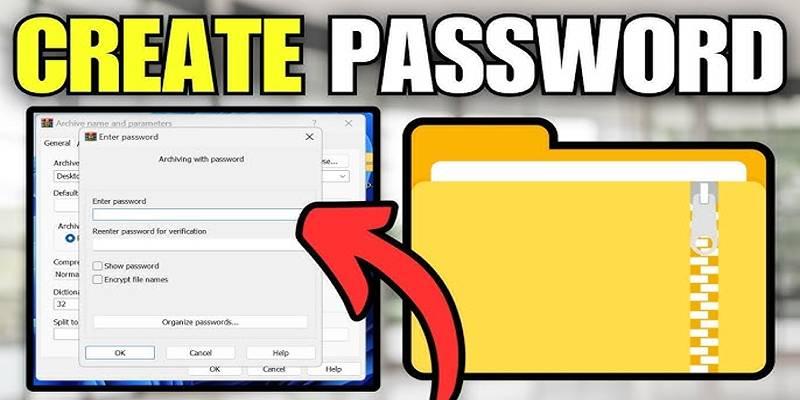
The process may vary slightly from one platform to another, but the general steps remain consistent. Below is a universal guide anyone can follow.
Step 1: Select a Reputable Online ZIP Tool
Several trusted websites allow password-protected ZIP creation. Some well-known options include:
- ezyZip
- ZIP Extractor (via Google Drive)
- PDFConvertOnline ZIP Tool
- Archive Extractor Online
- Files2Zip
The user should always verify that the site uses HTTPS encryption. A secure website helps ensure files aren’t exposed to third parties during upload.
Step 2: Upload Files
After choosing a tool:
- Click on the “Upload” or “Choose Files” button
- Select one or more files from the local device
- Alternatively, some platforms allow importing directly from Google Drive or Dropbox
Once uploaded, the files are displayed in a list for review.
Step 3: Add a Password
The next step is to locate the password field—typically labeled as “Set Password,” “Encrypt ZIP,” or “Secure with Password.”
- Enter a secure password (see tips below)
- Confirm the password to avoid mistakes
- Some tools may allow encryption type selection (e.g., AES-256)
Step 4: Compress and Download
After setting the password:
- Click the "Create ZIP" or "Compress Files" button
- Wait a few seconds for the ZIP file to be generated
- Download the final ZIP file to the desired location
The resulting file can now be shared, and only users with the password can access its contents.
Features to Consider When Choosing an Online ZIP Tool
Not every online ZIP tool is created equal. While some are great for simple tasks, others offer more robust features such as cloud support or high-level encryption.
Things to look for include:
- Password encryption options
- Drag-and-drop upload functionality
- File size limits (some allow up to 500MB)
- Support for multiple file formats
- Clear privacy or file deletion policy
For best results, users should read reviews or test multiple platforms to find the one that best suits their needs.
Best Practices for Creating Strong Passwords
A secure ZIP file is only as strong as the password protecting it. Weak or commonly used passwords can easily be cracked.
Here are simple guidelines for strong password creation:
- Use a combination of uppercase, lowercase, numbers, and symbols
- Avoid using birthdates, names, or simple patterns
- Aim for a password that’s at least 10–12 characters long
- Consider using a passphrase like “CoffeeOn$aturday@9am”
By following these practices, users make it significantly harder for unauthorized individuals to gain access.
Real-World Uses for Password-Protected ZIP Files
There are countless scenarios where creating a password-protected ZIP file online becomes useful. These are just a few:
Business and Freelance Work

Professionals who need to send invoices, project drafts, or legal agreements can add an extra layer of security with encrypted ZIP files.
Academic Submissions
Students often submit group assignments, presentations, or sensitive research. Password protection ensures only the intended recipient can view the work.
Personal Storage or Sharing
From photo albums to tax documents, keeping personal data secure is essential. Encrypted ZIP files help people store or share files with peace of mind.
Conclusion
Creating password-protected ZIP files online is a fast, user-friendly way to secure files without downloading extra software. Whether for work, study, or personal use, it offers an easy solution for anyone wanting to enhance their digital privacy. By selecting a reliable online tool, using a strong password, and following best practices, users can protect their sensitive data within minutes. And as digital communication continues to grow, knowing how to secure files online has become a modern-day essential.
On this page
Understanding ZIP Files and Why They Matter Why Password-Protect a ZIP File? Advantages of Using Online ZIP Tools How to Create a Password-Protected ZIP File Online Step 1: Select a Reputable Online ZIP Tool Step 2: Upload Files Step 3: Add a Password Step 4: Compress and Download Features to Consider When Choosing an Online ZIP Tool Best Practices for Creating Strong Passwords Real-World Uses for Password-Protected ZIP Files Business and Freelance Work Academic Submissions Personal Storage or Sharing ConclusionRelated Articles

Choosing Between Calendly and Doodle: Which Tool Suits Your Needs

High-Quality Music Video Editing: Best 5 Desktop Software Picks

Step-by-Step Guide to Creating Password-Protected ZIP Files Online

Smooth Your Shaky Videos: 4 Best AI Stabilizers for macOS

Top System Monitoring Software You Need for Smooth PC Performance
Trello vs. Asana: Which Project Management Tool is for You?

Safe and Secure: Free Antivirus Solutions for Daily Web Protection

Exploring The 5 Best Canva Alternatives for Creative Projects

Organize Your Drives with These Best Disk Partition Apps for Windows

Ultimate Guide to Google Calendar Settings
How to Convert OGV to MP4: 3 Fast and Easy Methods